 Free download for Mac
MirrorDroid
Your Android phone, on your Mac. No setup.
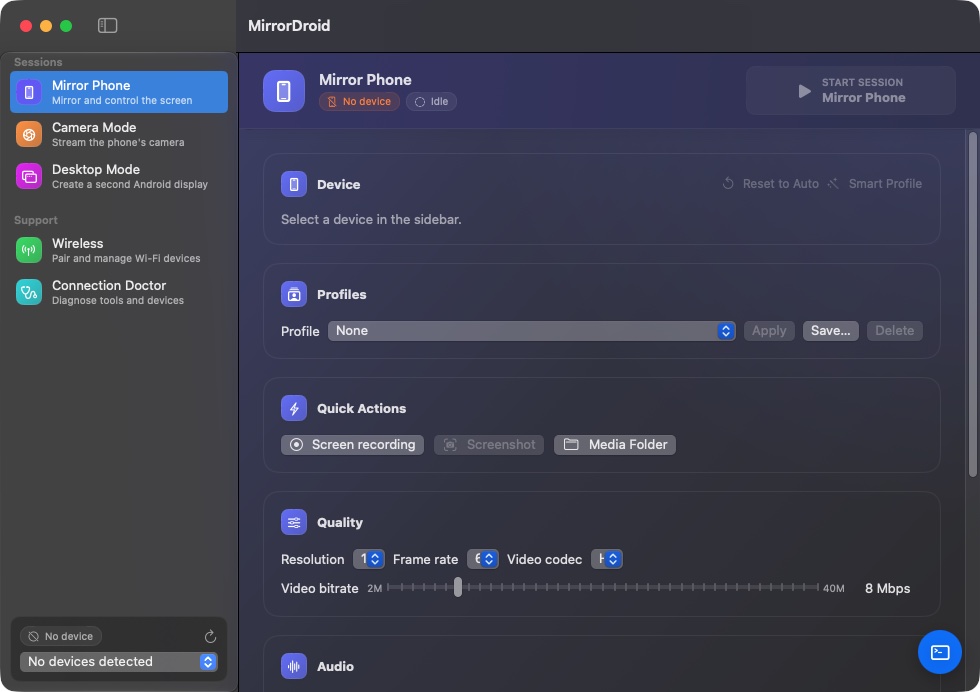
MirrorDroid puts your Android phone's screen in a Mac window that you control with your trackpad, mouse and keyboard. It bundles the open-source scrcpy engine and adb, so there's no Homebrew, no terminal and nothing else to install.
Mirror
Your phone in a Mac window, with full control.
Plug in your phone and its screen appears in a native macOS window. Click, scroll and type with your Mac's trackpad, mouse and keyboard, with low latency.
30-Second Product Walkthrough
Zero latency mirror • Click to preview
Instant phone control from your Mac trackpad.
No developer tools or terminal commands required. MirrorDroid launches scrcpy directly in the background with optimal hardware acceleration.
Plug & Play USB
Plug in via USB-C or USB-A cable. Auto-detects in under 2 seconds.
Native Apple Silicon Engine
Hardware-accelerated H.264/H.265 video decoding on M1 through M4.
Audio Forwarding & Recording
Forward internal device audio to your Mac speakers without virtual audio cables.
Everything in the box
Bundled runtime
scrcpy and Android platform-tools are inside the app. No Homebrew, no terminal, no developer tools.
Up and running in a minute
Download and open
Drag MirrorDroid into Applications. It already contains everything it needs.
Plug in your phone
Connect it with a USB cable. The guide shows how to turn on USB debugging for your phone's brand.
Use it from your Mac
The phone's screen appears in a Mac window. Click, scroll and type as if it were a Mac app.
What it will never do
- No account, no ads, no analytics in the app
- The phone's screen goes straight to your Mac over USB or your local network
- No root needed: it uses Android's standard debugging
- Recordings and screenshots are saved only on your Mac
Requirements
- macOS 14 Sonoma or later
- Apple Silicon (M1 or newer)
- An Android phone or tablet with Android 5.0 or later
- A USB data cable for the first connection
Version 1.0.0 · 14.5 MB · Apple Silicon
Opening it the first time
This early build isn't notarized by Apple yet, so macOS blocks it the first time. Open it once, then go to System Settings → Privacy & Security and choose Open Anyway. After that it opens normally.
SHA-256: 269ae581c1dc614bb73af43b381bae00d755e0cbd0112e1ff352219f5b8920c8
Questions
Is MirrorDroid free?
Yes. Every feature is free and unlocked, with no account or payment details. If that ever changes, existing users will be told first.
Do I need to root my phone?
No. MirrorDroid uses Android's standard USB and wireless debugging, which every phone has.
How is it different from using scrcpy directly?
scrcpy by Genymobile is an excellent free command-line tool. If you're comfortable in a terminal, use it directly. MirrorDroid wraps it in a Mac app with device detection, settings you can click, wireless pairing and a setup guide.
Does it work over Wi-Fi?
Yes. Pair once over USB, then connect wirelessly on the same local network.
MirrorDroid bundles scrcpy (Apache-2.0) by Genymobile and Android platform-tools. If you're comfortable in a terminal, use scrcpy directly; it's free. MirrorDroid exists for everyone who isn't.